Apple Adds Touch to MacBook Pro: What Changed and Who Benefits
- Gate
- AI & ML
- Departs
- Crew
- Andrew E. Freedman
- Passengers
- 436
Apple’s touchscreen MacBook Pro targets creators, but high prices, ergonomics and limited app support may slow adoption.
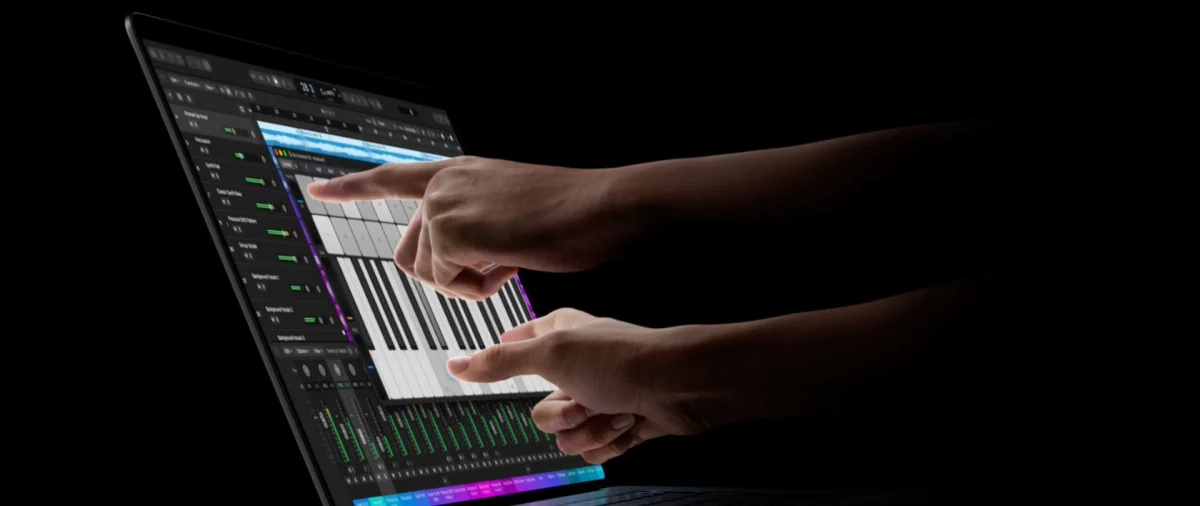
Apple’s first touchscreen MacBook Pro makes touch an optional input for Mac users, rather than a new way to use the whole computer. The redesigned 14- and 16-inch models pair touch displays with OLED, while keeping the keyboard and trackpad at the center of the experience. The move looks aimed at creators who already work across Macs, iPhones and iPads—and gives Apple a higher-priced tier in a mature laptop market.
Why Apple changed course
Touch has long been part of Apple’s phones, tablets and watches, but the company kept it off its laptops. Steve Jobs argued in 2010 that reaching up to a laptop display was uncomfortable: arms tire when held in the air, and touch surfaces work best when horizontal. The MacBook Pro’s new screen puts that old ergonomic objection to a practical test, without removing the familiar ways to control macOS.
Tom Mainelli, IDC’s group vice president of device and consumer research, told Tom’s Hardware that Apple tends to wait until it can distinguish a product before adopting a technology. He pointed to demand among Mac creators as the reason for the timing, while describing the business rationale as adding a more premium option to the professional range.
Apple executives have also tied the change to shifts in hardware and software. In an interview with Wired, chief hardware officer Johny Srouji said that display technology, Apple’s custom silicon and software architecture had changed over the past decade and now met the company’s standard. Marketing chief Greg Joswiak added that younger creators who use iPhones and iPads expect to touch their MacBook Pros.
The new models also bring OLED displays, updated speakers and lighter designs, though they cost more than existing MacBook Pros. OLED has been familiar in Apple’s other product lines for years; touch is the more consequential change for how people interact with the Mac.
A late arrival to a familiar feature
Touchscreen laptops have had a long run outside Apple’s lineup. HP’s TouchSmart tx2 offered a swiveling touchscreen in 2008. Microsoft’s Surface Laptop RT and Windows 8 helped push touch further into the PC market in 2012, and touch became common across Windows laptops in the years that followed. By Windows 11’s 2021 launch, it was often an expected feature outside the lowest-cost machines.
Chromebooks took a similar route. Google’s Chromebook Pixel used touch as a premium feature in 2013. As Google later brought Android apps to Chrome OS, touch became more useful: many apps built for phones and tablets are easier to operate with a finger than with a trackpad. The broader lesson for Apple is that touch tends to matter most when software gives people a reason to reach for the screen.
Even Apple’s lower-cost MacBook Neo has sharpened the comparison with PC rivals. The Neo cuts features such as a backlit keyboard, while some competing notebooks, including Dell’s XPS 13 and HP’s OmniBook 5, include touchscreens. Acer’s Swift Air 14, by contrast, dropped touch. That makes the feature a product choice rather than a universal requirement, even in the same broad market.
Mac touch, with the trackpad still in charge
Apple’s approach depends on macOS apps being ready for direct interaction. macOS 27 Golden Gate adds system gesture APIs intended to make touch support more practical for app developers. Apple says its own software is prepared, and named Microsoft Office, Zoom, Notion, DaVinci Resolve, Adobe Lightroom, Blender and Algoriddim djay Pro among the apps that support the feature.
That list spans office work, video and image editing, 3D design and music, but the presence of touch support doesn’t mean each workflow will improve. Tapping a control or moving through a timeline may feel natural; precise creative work can still favor a mouse, trackpad or dedicated tablet. Specialty drawing tablets, in particular, remain the better fit when accuracy and pen control matter.
There are practical tradeoffs, too. Touch layers can add cost and weight, and have traditionally raised concerns about battery use. The source doesn’t provide measurements for the new MacBook Pro, so the real effects on endurance and portability will need hands-on assessment. More broadly, an operating system built around keyboard and pointer input can make touch feel like an extra option instead of a first-class workflow. Apple has retained both keyboard and trackpad, signaling that this Mac is touch-capable, not touch-first.
Price and reach will decide adoption
The touchscreen is launching only on the redesigned 14- and 16-inch MacBook Pro models. They start at $2,899 and $3,399, respectively, placing the feature in an expensive part of Apple’s lineup. That limits how many Mac users can try it and makes the case for touch depend on whether it adds enough value to professional work.
Touch could eventually reach less expensive MacBook Pro configurations, the MacBook Air or even the Neo. A touchscreen iMac is another possibility raised by the source, though there’s no announced timing. OLED itself is only now arriving on Mac, which suggests that spreading new display technology across the lineup may take years.
For now, the key question is whether Mac creators use touch often enough to justify the added cost and whether developers make screen interaction feel native across their apps. Apple has supplied the hardware and gesture APIs; broader adoption will depend on the more affordable models and the everyday usefulness of those controls. Until then, the MacBook Pro’s touch display is best understood as another input for particular tasks, with the keyboard and trackpad still doing most of the work.