Elastic Cloud on Azure Adds Cobalt ARM Instances for CPU-Heavy Workloads
- Gate
- AI & ML
- Departs
- Crew
- Joe Chin,Greg Crist
- Passengers
- 546
Elastic’s new Azure profile uses Cobalt ARM processors and local NVMe storage, with the company reporting up to 44% better price-performance in its tests.

Elastic Cloud Hosted deployments on Azure can now use compute-optimized virtual machines built on Microsoft’s Cobalt ARM processors. The new profile gives Elasticsearch teams another way to tune infrastructure for CPU-heavy work, with local NVMe storage as a second performance consideration. Elastic says its tests found up to 44% better price-performance than Fsv2 instances. That figure is a company result, not a guarantee for every deployment: the practical gain will depend on workload, configuration and resource bottlenecks.

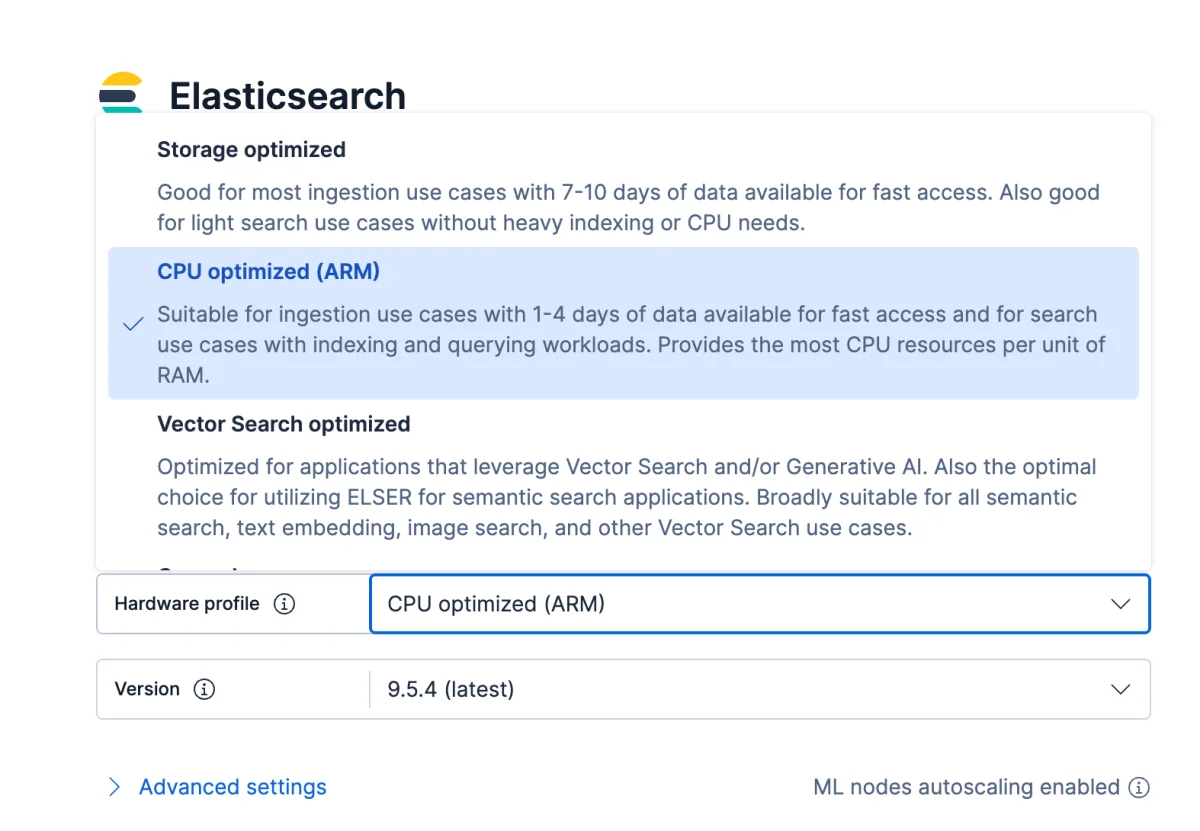
The profile is called CPU Optimized (ARM) in Elastic Cloud and runs on Azure’s Dpldsv6 VM series. Elastic identifies indexing, aggregations and several search patterns as operations that can benefit, including keyword, vector, semantic and hybrid search. The change is most relevant when processing capacity limits throughput or query response. Moving to a different processor architecture is a meaningful infrastructure choice, so teams should evaluate it against their own workload before treating the reported improvement as an expected outcome.

What changes in the infrastructure
The Cobalt processors are designed by Microsoft for Azure workloads, while the Dpldsv6 profile pairs them with directly attached NVMe storage. Elastic says this local storage can improve random read performance compared with remote-attached premium storage. That may matter to Elasticsearch operations that repeatedly read data, but it does not mean every storage-bound deployment will see the same benefit. The new profile’s main stated purpose is compute optimization; the effect of its storage and memory characteristics will depend on how a deployment uses its resources.

For practitioners, the key question is where time is being spent. High CPU use during query or indexing peaks points toward a possible fit. Dense kNN vector search, hybrid search with substantial reranking, and frequent aggregations over long date ranges are examples Elastic calls out. These workloads can involve substantial computation, but their performance can also depend on data layout, query shape, shard activity, available memory and storage behavior. A profile change is therefore best assessed with representative traffic and measurements of the operations that matter to the application.

Deployments that spend much of their time waiting on storage or constrained by memory may have a different result from CPU-bound clusters. Elastic says those workloads may still benefit from the instances’ updated I/O and memory characteristics, but the source provides no separate measurements for those cases. Teams should compare their current utilization and query behavior with results after migration, rather than extrapolating the up-to-44% figure to every workload.

Choosing and migrating to the profile
Teams creating a deployment through the Azure Portal can select an Elasticsearch Marketplace offering, such as Search, Observability or Security. After creating the deployment, they can open its resource, choose Advanced Settings and select “Manage changes in Elastic Cloud.” In the Elastic Cloud Console, the hardware profile can then be changed to CPU Optimized (ARM).

The profile is also selectable when creating a deployment directly in Elastic Cloud. During configuration, teams can choose CPU Optimized (ARM), which uses Dpldsv6, instead of the default Storage Optimized profile. The source also points new users to a free 14-day trial.

For an existing deployment, the migration flow starts from its overview page. Open the deployment, choose Edit beside the current hardware profile, select CPU Optimized (ARM), review the proposed changes, then update and confirm. Elastic says migration proceeds one node at a time to keep the deployment available. That approach spreads the work across the cluster: duration generally rises with deployment size, and deployments with more nodes, more data or heavier shard activity can take longer. Teams planning a change should account for that time and consult the hardware profile documentation and migration guide.

Regional availability and what to measure
The profile is available in seven Azure regions: Australia East (New South Wales), West Europe (Netherlands), West US 2 (Washington), Central US (Iowa), Canada Central (Toronto), South Central US (Texas) and France Central (Paris). Elastic says more regions will be added as capacity becomes available. Availability is therefore a practical constraint for teams whose deployment location is not on this list; the Azure region reference provides the current coverage.

The most useful next step for an interested team is a workload-specific comparison. Track CPU utilization and the performance of representative indexing, search and aggregation tasks before and after a profile change. Include migration duration in the evaluation, and check whether the target region has capacity. Elastic’s result makes Cobalt ARM worth investigating for compute-bound Elasticsearch clusters, while the value for any individual deployment remains a measurement question.